
🧅
Truly peer-to-peer
Each copy of Seal Chat has its own Tor .onion address. Messages travel directly to your contact's computer — no relay, no cloud, nothing in the middle.
No servers · No accounts · Your own key
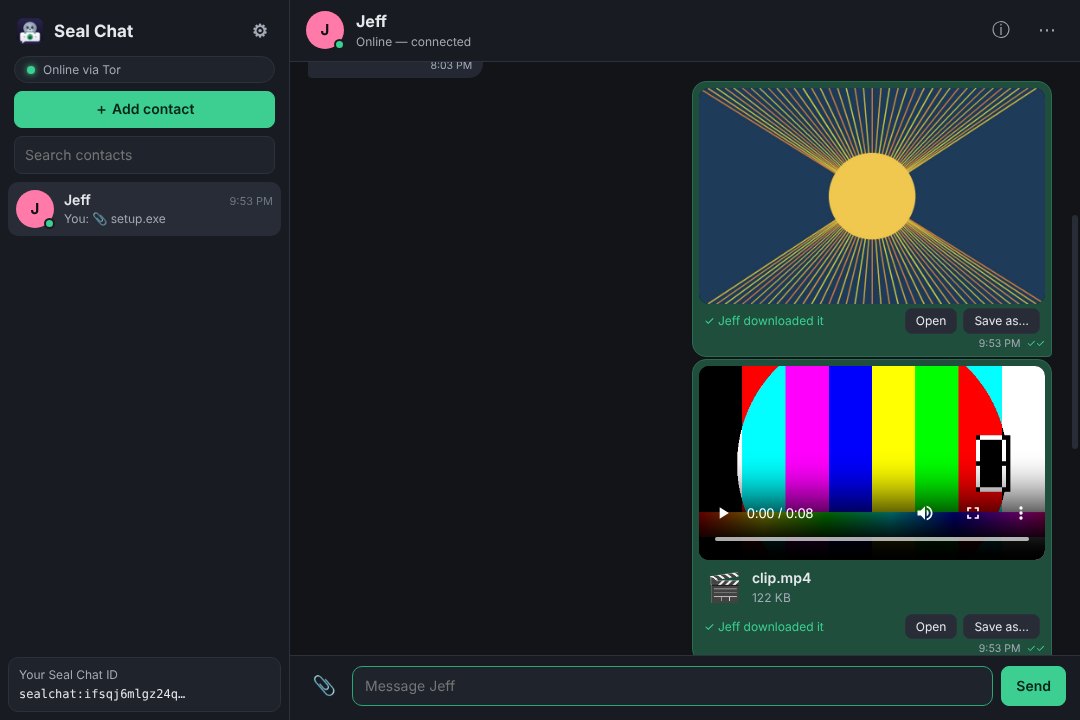
Seal Chat sends messages, photos, videos and files directly between computers over the Tor network. Every message is signed and encrypted with your own PGP key, and nothing is ever stored on anyone's server — because there isn't one.
Free for Windows 10/11, macOS 13+, 64-bit Linux and Android 7+.
Seal Chat is built around one idea: your conversations belong to the two people having them.
Each copy of Seal Chat has its own Tor .onion address. Messages travel directly to your contact's computer — no relay, no cloud, nothing in the middle.
Import the OpenPGP key you already use (RSA or modern ECC) or let Seal Chat create one. Every message is signed by you and encrypted to them.
Send any file up to 4 GB. Photos show in the chat, audio and video play right there, and broken transfers pick up where they stopped.
Messages wait in your outbox and go out by themselves the moment your contact's Seal Chat comes online — usually within seconds.
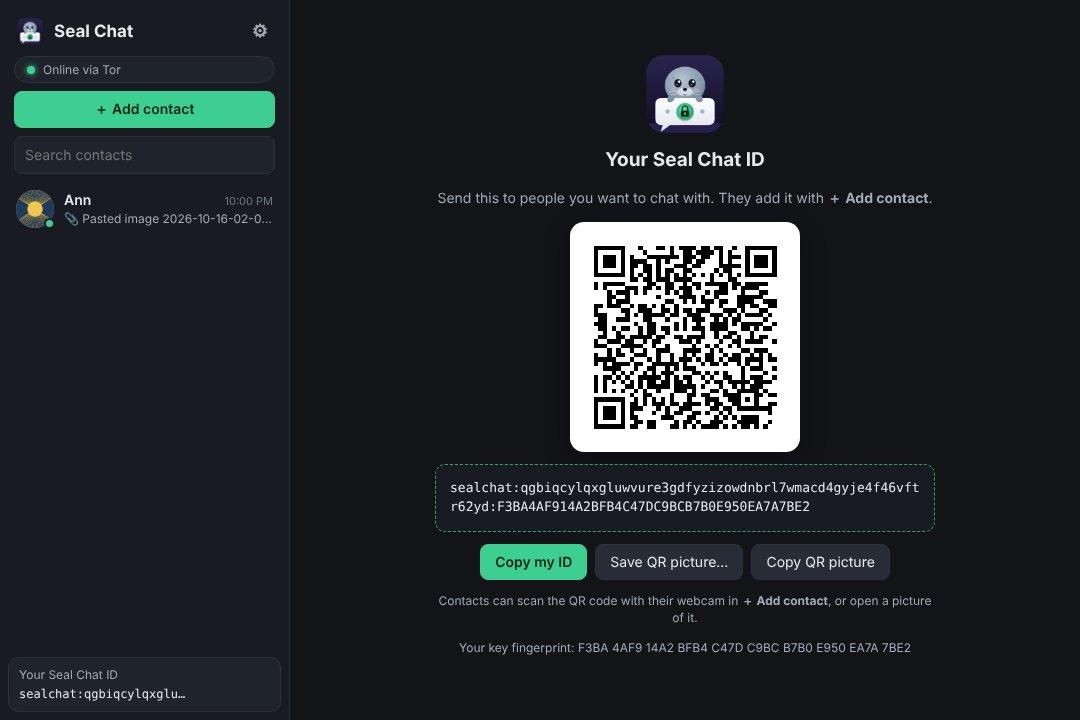
Show your QR code, send it as a picture, or scan theirs with your webcam. Your ID includes your key fingerprint, so nobody can pretend to be you.
A 60-digit safety number, identical on both computers, lets you confirm by phone or in person that nobody is in the middle.
Share your profile picture with contacts — or don't. And pick your own picture for anyone, whatever they share.
Chats, files and keys are encrypted on disk and tied to your Windows, Mac or Linux account. Add a PIN (or Windows Hello) for a second lock.
Use your existing PGP private key or create a new one. Seal Chat starts its own built-in copy of Tor — nothing else to install, no router settings, no port forwarding.
In under a minute you get an ID like sealchat:…onion:FINGERPRINT and a matching QR code. Send it to the people you want to talk to.
They paste your ID or scan your QR code. Seal Chat checks the key at your address matches the fingerprint, sends a signed request, and once you accept — you're talking.
Layer on layer — and an honest list of what any serverless messenger can't do.
Version 1.9.5 · released October 21, 2026. Tor is built in — nothing else to install.
Windows 10 and 11, 64-bit
d08ef8b4ca842ae17b08c3093f2edb04b7062ee628fab1da0731599410ebff2fMacs with M1, M2, M3, M4 … · macOS 13+
Which Mac do I have? · First start
4a19938ba95aafd1c8b99bc8a646b393395cdf959169960e36223f975374ad65Only for Macs that can't upgrade to macOS 13 or newer. If yours can, use the download above.
Download the macOS 12 version (.dmg · 1.7.0, updates itself to 1.9.5 · 143 MB)
SHA-256 4c285c89120c1822c536d782f7e1cd348dc2039995b824b5b3cb9f28feae2e6f
Macs with an Intel processor · macOS 13+
Which Mac do I have? · First start
0ddfb5a7ba8b3d9b4ee32dc524dcf1e3e06ace06cf98133654bae34c3e65e165Only for Macs that can't upgrade to macOS 13 or newer. If yours can, use the download above.
Download the macOS 12 version (.dmg · 1.7.0, updates itself to 1.9.5 · 150 MB)
SHA-256 fd7079f9cd8d95dab8567945d8fc9f22c42028cb40075c18ca1e98a66bb72b3a
Ubuntu, Debian, Mint, Pop!_OS
7c60a6ff6a2cab26f4e7db4a9820f637348776dc7ce51b2b12b99df16061f0beAny 64-bit Linux
2ea02c24041859f1f79ad662801719be72995177bdff727a35b13a429ad2acbbWindows, macOS and Linux — already installed
53714540f19dc05d4ad8462c62beb091527b888a96f2a32c52cdb9e30aebf5a2Run the installer. If SmartScreen says "Windows protected your PC", click More info → Run anyway (the installer isn't code-signed).
Open the .dmg and drag Seal Chat onto Applications. The first time, macOS can't check the app — see first start on a Mac (one-time, about a minute).
sudo apt install ./SealChat-*.deb, or chmod +x the AppImage and run it. Have a desktop keyring (GNOME Keyring / KWallet) running.
Seal Chat 1.3 and newer tell you when an update is out and install it for you (signed and verified). Older versions: get the update file, then Settings → About & updates → Install update file… — one file works on Windows, macOS and Linux.
On an Android phone? Get the Android app. iPhone: Seal Chat Web adds a web interface on your own hosting. Need a hand? Read the help guide.
The same Seal Chat — same ID format, same encryption, built-in Tor — for macOS 13 Ventura and newer. It lives in the menu bar and works with your contacts on Windows and Linux.
Click the Apple menu → About This Mac:
Picked the wrong one? The Intel version also runs on Apple Silicon (more slowly, through Rosetta) — the Apple Silicon version doesn't run on Intel Macs.
Open the .dmg and drag Seal Chat onto Applications.
Open Seal Chat from Applications. macOS says it can't check the app ("Apple could not verify…") — click Done (or OK).
Open System Settings → Privacy & Security, scroll down and click Open Anyway next to Seal Chat, then confirm with your password.
That's it — from now on it opens normally, and updates install by themselves.
shasum -a 256 SealChat-*.dmg in Terminal).The full Seal Chat — its own Tor .onion address, your own PGP key, the same encryption — running on your phone. It isn't in the Google Play Store, so you install it straight from this page. Android asks you to allow that once.
On your phone, open this page and tap Download on the Android app card. If Chrome warns that the file may be harmful, tap Download anyway.
Open the file: tap Open when the download finishes (or find SealChat-….apk in the Files app → Downloads).
Allow apps from this source. Android says it can't install apps from unknown sources: tap Settings, turn on Allow from this source, then go back. (It's for the app that opened the file — Chrome or Files. Android 7: Settings → Security → Unknown sources.)
Tap Install. If Google Play Protect asks to scan or says the app is unrecognised, tap More details → Install anyway — it only means the app isn't from the Play Store.
Open Seal Chat and tap Allow for notifications. When it asks to keep running in the background, allow it (battery: Unrestricted) — otherwise Android pauses it and messages arrive late.
New ID or your computer's? Create a new Seal Chat ID, or tap Link to my Seal Chat on another device: on your computer open Settings → Your devices → Link a new device… and type the code it shows into the phone. Your contacts and chats then appear on both.
Optional: turn Allow from this source back off (Settings → Apps → Chrome or Files → Install unknown apps). Seal Chat keeps working and updating.
Android 7.0 or newer · phones and tablets
9e394d1109994e8590d5f8dce990e200a1f26055771469b65d747c8db555276eSeal Chat Web is a small add-on you put on your own web hosting. Open it in your phone's browser and chat through the Seal Chat running on your computer — your key never leaves your computer.
The web interface in Safari or Chrome. Add it to your home screen and it opens like an app.
Seal Chat Web passes the sealed messages along. It can't read them and never has your key.
Seal Chat does the real work as always: your PGP key, Tor, your contacts and chats.
Upload the Seal Chat Web folder to your hosting, e.g. /public_html/chat/. Needs PHP 8 and https.
Open …/chat/admin.php. Enter the setup code (the page shows which file it is in — open it with your host's File Manager) and choose an admin password.
Turn the web interface on and click Copy link.
In Seal Chat (1.4.0 or newer): Settings → Web access → paste the link → Connect → Turn on.
Pair your phone: click Pair a device…, scan the QR code with your phone's camera, choose a PIN, compare the code, and click Approve.
iPhone: open the page in Safari and tap Share → Add to Home Screen before pairing, then pair from the new icon — it opens like an app and stays paired.
Web interface for your own web hosting
4d86359f11caef72977d852c720157dddc1e0d487fb1bd6f0ca22c5f990826deWorks with any shared hosting that runs PHP 8 over https (cPanel, LiteSpeed, Apache). No database. Settings are kept outside your public web folder.
A step-by-step guide with screenshots, and the complete source code for anyone who wants to check how Seal Chat works or build it themselves.
Right. Seal Chat uses Tor onion services: each copy publishes its own .onion address, and contacts connect to it directly. Your messages pass through Tor's volunteer relays in encrypted form, but no relay can read them or tell who is talking to whom — and nothing is stored anywhere except on the two computers.
No. Seal Chat can create a key for you in one step. If you already have a PGP key (from GnuPG, Kleopatra, etc.), you can import it and keep using the same identity.
Your message waits in your outbox and is delivered the moment their Seal Chat starts or reaches you. Files work the same way, and large ones can arrive over several sessions.
Most home networks work without any setup — no port forwarding needed. If a network blocks Tor (some workplaces, hotels or countries), add Tor bridges in Settings → Connection.
Yes — macOS 13 Ventura or newer, on both Apple Silicon (M1 and later) and Intel Macs (Macs that can't go past macOS 12 Monterey: see "Still on macOS 12?" in the macOS download card). Because it isn't registered with Apple, macOS asks you to allow it once in System Settings → Privacy & Security → Open Anyway. Step-by-step here.
Yes. It's the same Seal Chat everywhere, so a contact on any of the three works exactly the same way.
Yes (Seal Chat 1.9.0+): install Seal Chat on the new device, choose Link to my Seal Chat on another device on its first screen, and enter the code from Settings → Your devices → Link a new device… on the one you already use. Both then share your ID, contacts and chats. To move to a new computer instead, save an encrypted backup in Settings and restore it there.
Yes — get it here (Android 7.0 or newer). It isn't in the Google Play Store, so Android asks you once to allow installing apps from your browser or Files app ("unknown sources"). It's the full Seal Chat with its own Tor address, and it updates itself from the same signed update files as the desktop. You can give it a new ID, or link it to the Seal Chat on your computer so both have your contacts and chats.
The setting only lets the one app you allow (e.g. Chrome) install apps; you can turn it off again right after installing. Get the APK only from this page, and if you'd like to be sure it's the published file, compare its SHA-256 checksum under the download. Updates after that are checked against Seal Chat's signing key before they're used.
Yes, with Seal Chat Web on your own web hosting (Seal Chat 1.4.0 or newer; contacts and notifications on the phone need 1.6.0). Your phone becomes a remote screen for Seal Chat on your computer, so the computer has to be on and running Seal Chat. There's no app to install from an app store — it runs in Safari or Chrome, and you can add it to your home screen.
Yes (Seal Chat 1.7.0 with Seal Chat Web 1.2.0): tap 📎 next to the message box to send photos, videos or files up to 100 MB. They go to Seal Chat on your computer in sealed pieces — your website can't read them — and your computer sends them to your contact over Tor. Files in your chats can be opened or saved on the phone too, also up to 100 MB; bigger ones open on your computer.
Yes (Seal Chat 1.6.0 with Seal Chat Web 1.1.0): in Seal Chat Web open the menu ⋯ → Notifications. They say "New message" — or "New message from Alice" if you allow names — and never show the message itself. Seal Chat on your computer sends them, encrypted for that phone only, through your phone maker's push service; your website isn't involved. On iPhone and iPad they work in the Home Screen version (Safari → Share → Add to Home Screen, iOS 16.4 or newer).
No. Between your phone and your computer everything is sealed with a key made when you pair them, and the website only passes those sealed messages along. Your PGP key never leaves your computer. The one thing to protect is your hosting account itself: someone who could change the website's files could change the page your phone loads.
Yes — Seal Chat Web runs on web hosting you control (any host with PHP 8 and https, like a typical cPanel account). There's no central Seal Chat server, so your phone talks to your computer through your own site.
Yes — download it here. It's the complete source of the app; the README inside explains how to build it.
Open the contact's details (ⓘ) and compare the 60-digit safety number with them by phone or in person. If it matches on both computers, mark them as verified.